App
Judge & Decision Engine
Configure semantic evaluation with an Evaluation Judge and an optional Decision Engine.
How Semantic Evaluation Works
Semantic checks evaluate whether a completed answer satisfies a freeform assertion. Define them in eval.agent_assertions. The Evaluation Judge is an LLM agent that returns a pass/fail verdict and a short reason for each check.
The optional Decision Engine evaluates those checks first, estimating the probability that the answer satisfies each assertion. MCPLab accepts clear pass or fail results and asks the judge to evaluate uncertain results or checks the engine could not evaluate.
These settings apply to CLI runs, queued and immediate app evaluations, Rover/live evaluations, and immediate MCP evaluation runs. They evaluate completed answers from API and browser agents. Tool constraints, sequences, input assertions, and deterministic response checks keep their existing evaluation logic.
Configure the engine in Settings alongside the judge. It is separate from the agent under test and conversational assistant settings; there is no Decision Agent to add to the library. Use an MCPLab build with the Decision Engine section in Settings.
Configure the Evaluation Judge
In Library, configure an LLM agent with a provider and model to use as your judge. Supply its provider credentials to the MCPLab process, then open Settings, find Evaluation Judge, and choose the agent under Default Evaluation Judge. The selection saves when you change it.
A browser agent cannot be the judge. Semantic checks require a valid judge, including when the Decision Engine is enabled. Scenarios with only deterministic checks do not need one. Without a decision configuration, the judge evaluates all semantic assertions in one batched request.
my-judge:
  name: Evaluation judge
  provider: anthropic
  model: claude-haiku-5-5
  temperature: 0
Write Checks and Choose Evidence
Write one specific requirement per assertion. Both evaluators receive the final answer and assertion prompts. The judge evaluates that evidence without calling tools. By default, evaluation includes only the final answer; eval.agent_context adds the requested context when available.
Use include_prompt to judge whether the answer addresses the original request. include_tool_sequence adds called tool names, and include_tool_inputs adds tool names and arguments. These options default to false and apply to all semantic assertions in the scenario.
Browser evaluations cannot supply tool observations that Rover did not capture. Semantic evaluation of an answer does not prove that a browser agent used a tool. For exact tool-use requirements, use Tool and Response Assertions.
eval:
  agent_context:
    include_prompt: true
  agent_assertions:
    - label: addresses_question
      prompt: Confirm the final answer directly addresses the original question.
    - label: logical_time_range
      prompt: Confirm the answer includes an earliest and latest timestamp in chronological order.
Enable or Disable the Decision Engine
After selecting a judge, open Settings and find Decision Engine. Choose a Decision provider and its model: the field is labeled Decision model, Ollama model name, or Deployment name for Azure Foundry. For Ollama, enter the backend-reachable Ollama server URL. Turn Use Decision Engine on, set both probability thresholds, then click Save Decision Engine.
Provider, model, server URL when applicable, both thresholds, and the Use Decision Engine toggle save together. Changes need the explicit Save button. Saving validates configuration; use Test connection to check the endpoint, credentials, and model, then run a scenario with semantic checks.
To temporarily disable decisions, turn Use Decision Engine off and save. MCPLab retains the provider, model, URL, and thresholds and sends semantic checks directly to the judge, without decision requests or decision metadata. Turn it on and save to resume. Older saved configurations without an enabled flag remain on.
Choosing None and saving clears the decision configuration. Turn off and save, or clear, the engine before removing its backup judge. Semantic checks still require a valid LLM judge while the engine is off. Existing workspaces without decision settings continue to use the judge.
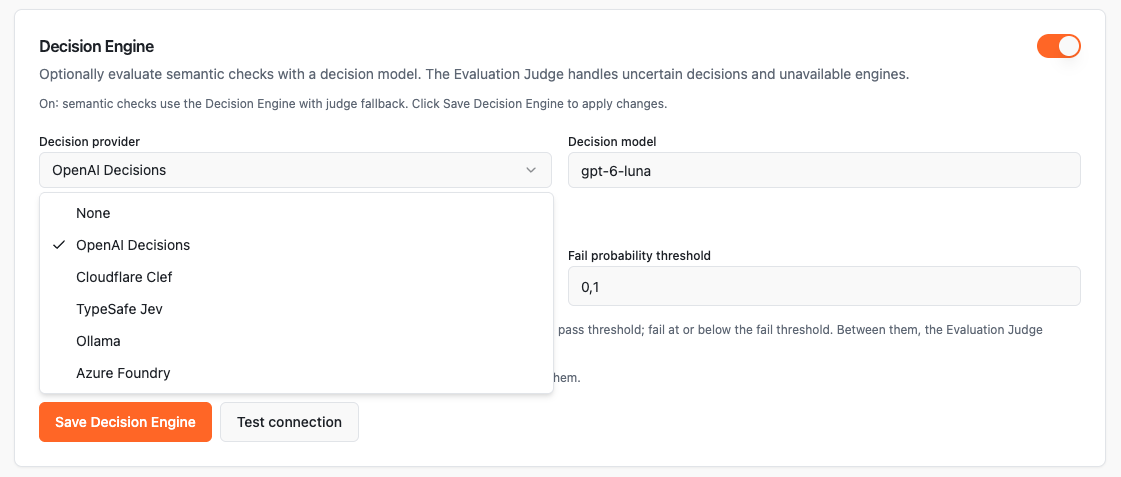
Test the Decision Connection
Click Test connection in Settings to send one small synthetic assertion through the selected provider using the current form values and backend credentials. The test does not save settings or invoke the Evaluation Judge, and it works before saving or while Use Decision Engine is off.
A valid probability means the connection test succeeded, even if it lies between the thresholds. Thresholds route real semantic checks; they do not determine connection success. Missing credentials, refusals, invalid answers, HTTP errors, and unavailable endpoints produce test failures.
Editing the configuration clears the result and cancels a pending test. Hosted decision tests use a 10-second timeout and Ollama uses 120 seconds, with no automatic retry. Success confirms this request worked; it does not guarantee future availability or accurate verdicts.
Decision Providers and Models
These are MCPLab's provider choices and model defaults. Hosted access depends on your provider account; selecting a provider in MCPLab does not grant API access.
- None: semantic checks use the Evaluation Judge.
- OpenAI Decisions (
openai): fixed modelgpt-6-luna; requiresOPENAI_API_KEY. The OpenAI Decisions guide documents the API, currently in public beta. - Cloudflare Clef (
cloudflare): chooseclef-flash(default) orclef; requiresCLOUDFLARE_ACCOUNT_IDandCLOUDFLARE_AUTH_TOKEN. Follow Find Your Cloudflare Token and Account ID, then see the official Clef Flash and Clef references. - TypeSafe Jev (
typesafe): editable model ID, defaultjev-1.13.0; requiresTYPESAFE_API_KEY. Get a key through the TypeSafe console linked in the official quick start, and check available models. - Ollama (
ollama): editable Ollama model name, defaultclef-flash. Suggestions includeclef-flash,clef,nimble,tev1:4b, andtev1:0.8b. Enter the exact installed name fromollama list, including its tag; suggestions do not show installed models. No API key is required. - Azure Foundry (
azure_foundry): editable Deployment name, suggestedMicrosoft-Decision-1. Use the name of your Microsoft-Decision-1 deployment. RequiresAZURE_FOUNDRY_ENDPOINTandAZURE_FOUNDRY_API_KEY, or anAZURE_OPENAI_API_KEYfor the same resource. Follow Azure Foundry decision setup.
Supply Credentials to the Backend
The backend is the process running MCPLab, on your machine, in a container, in CI, or as an MCP server. Give that process the required environment variables. Credentials are not Decision Engine form fields and are not stored in workspace YAML.
The CLI/app loads .env from its working directory, or you can export variables before launching it. Restart MCPLab after changing credentials. For an independently launched MCP server, explicitly supply its environment. Your backup judge also needs its own provider credentials. See Environment Variables.
Find Your Cloudflare Token and Account ID
For Cloudflare Clef, get both values from the same account in the Cloudflare dashboard. The account ID identifies your account; the API token authorizes MCPLab's requests. These steps follow the official Workers AI REST API setup.
If you create a token manually, grant Workers AI Read and Edit permissions for the account whose ID you copied. Export the values before starting MCPLab, as shown below, or put them in its working directory's .env file. Restart an already-running backend after changing them.
- Open your account's Workers AI page in the dashboard, then select Use REST API.
CLOUDFLARE_AUTH_TOKEN: select Create a Workers AI API Token, review the prefilled settings, click Create API Token, then Copy API Token. Use the copied token as this variable's value.CLOUDFLARE_ACCOUNT_ID: on the same REST API setup page, find Get Account ID and copy the Account ID value. Use it as this variable's value.
export ANTHROPIC_API_KEY='your-judge-provider-key'
export CLOUDFLARE_ACCOUNT_ID='your-account-id'
export CLOUDFLARE_AUTH_TOKEN='your-workers-ai-token'
npx @inspectr/mcplab app
Configure Azure Foundry Decisions
In the Foundry portal, open your project, find Microsoft-Decision-1 in Model catalog, and deploy it. From the deployment details, copy the resource endpoint, deployment name, and API key. See Microsoft's Decision API guide for deployment and availability details.
Set AZURE_FOUNDRY_ENDPOINT to the resource endpoint, for example https://your-resource.services.ai.azure.com. Use the resource URL without /api/projects/... or a decision API path. Set AZURE_FOUNDRY_API_KEY on the backend and restart MCPLab. If it is absent, MCPLab uses AZURE_OPENAI_API_KEY; that key must belong to the same resource. The dedicated Foundry key takes precedence, and the endpoint is always explicit.
In Settings, select Azure Foundry and enter the actual Deployment name, which may differ from Microsoft-Decision-1. Click Test connection, then save the engine. MCPLab appends /providers/microsoft/v1/systemone to the resource endpoint and uses API-key authentication. This integration does not acquire Microsoft Entra tokens.
Foundry conversational agents use their own deployment names. Configure them separately in Library; decision settings do not change the agent under test, assistant, or judge model.
AZURE_FOUNDRY_ENDPOINT=https://your-resource.services.ai.azure.com
AZURE_FOUNDRY_API_KEY=your-resource-key
Route Results with Probability Thresholds
Let p be the engine's estimated probability that the assertion is satisfied. Both thresholds use this satisfaction probability. The defaults are pass 0.9 and fail 0.1, with inclusive boundaries.
With assertions at 0.95, 0.05, and 0.5, MCPLab accepts the first as passed, accepts the second as failed, and judges only the third. A clear engine failure is final for that assertion; it is not sent to the judge for another verdict.
The fail threshold is not the probability of failure. A fail threshold of 0.1 means a satisfaction probability of 10% or less produces a failure. Thresholds must be finite numbers satisfying 0 <= failThreshold < passThreshold <= 1.
Raise the pass threshold or lower the fail threshold to send more uncertain checks to the judge. Lower the pass threshold or raise the fail threshold to accept more engine verdicts. Validate changes against representative labeled examples; model probabilities and these routing thresholds do not guarantee correct verdicts.
p >= 0.9: Decision Engine passes the assertion, including exactly0.9.p <= 0.1: Decision Engine fails the assertion, including exactly0.1.0.1 < p < 0.9: Evaluation Judge evaluates the assertion.
Run Decisions with Ollama
Ollama evaluates decisions on your configured server. If the Decision Engine is unavailable or uncertain, MCPLab uses your Evaluation Judge. If that judge uses a hosted provider, fallback evaluation sends the answer and included context to that provider.
Install or update Ollama from the download page. Check ollama --version: Tev1 and Nimble require 0.35.0 or later; Clef and Clef Flash require 0.35.1 or later. See Ollama decision capabilities. Start the server, then pull the model you want to use. MCPLab does not download models automatically.
For Together AI's experimental Tev1 models, pull tev1:4b or tev1:0.8b and enter that exact name in Ollama model name. Check installed names with ollama list. See the official Tev1 model page. To use MCPLab's default instead, pull clef-flash.
Choose Ollama in Settings and set the server URL, normally http://localhost:11434. Requests originate from the MCPLab backend, not your browser. localhost means the machine or container running that backend. For a remote or containerized server, use a URL the backend can reach.
MCPLab appends /v1/systemone to the server URL. Enter the base URL without that endpoint. HTTP and HTTPS are supported, but embedded credentials, query strings, and fragments are rejected. Only Ollama supports a custom server URL.
ollama --version
ollama serveollama pull tev1:4b
# Or use the smaller Tev1 model:
# ollama pull tev1:0.8b
# Or use MCPLab's default (requires Ollama 0.35.1+):
# ollama pull clef-flashCheck the Ollama Endpoint
Run this optional cURL check from the machine or container running MCPLab. Change the URL and model to match your configuration. A usable response has a numeric answers.is_negative.noul between 0 and 1, estimating whether the feedback is negative. It is a probability, not a boolean.
Use the /v1/systemone API for decisions. Ollama's detailed decision documentation currently directs Python users to the TypeSafe SDK; see its decision examples. MCPLab calls the HTTP API directly, so no Python SDK is needed for MCPLab setup.
curl --fail-with-body http://localhost:11434/v1/systemone \
  -H 'Content-Type: application/json' \
  -d '{
    "model": "tev1:4b",
    "state": "The order arrived five days late and the box was crushed.",
    "questions": {
      "is_negative": {
        "type": "noul",
        "instructions": "Is the customer describing a negative experience?",
        "criteria": {
          "true": "The customer describes a bad experience.",
          "false": "The experience is neutral or positive."
        }
      }
    }
  }'
Configure the Workspace with YAML
These are workspace settings, stored in .mcplab-app-settings.yaml in the library/bundle directory, normally mcplab/.mcplab-app-settings.yaml. Keep them separate from scenario YAML and agent definitions. In this example, my-judge must exist in the workspace agent library.
For a hosted provider, use its configuration ID and model and omit baseUrl. For Azure Foundry, model is the deployment name and the endpoint comes from backend environment variables. Omitted thresholds use 0.9 and 0.1; Ollama's omitted URL uses http://localhost:11434. Keep credentials in the process environment.
Set enabled: false to retain the configuration while using judge-only evaluation; an omitted flag means enabled. Remove evaluation_decision to clear it. If using the app settings API, PUT /api/settings uses camelCase fields evaluationJudgeAgentName and evaluationDecision. Send evaluationDecision: null to clear the engine; omitting the field in an API update leaves it unchanged.
For an API connection test, POST /api/settings/decision/test accepts the decision configuration directly, without an evaluationDecision wrapper. It does not save settings. A completed test returns HTTP 200 with ok: true or ok: false; invalid configuration returns HTTP 400. Check ok rather than treating every HTTP 200 as success.
evaluation_judge_agent_name: my-judge
evaluation_decision:
  enabled: true
  provider: ollama
  model: tev1:4b
  baseUrl: http://localhost:11434
  passThreshold: 0.9
failThreshold: 0.1evaluation_judge_agent_name: my-judge
evaluation_decision:
enabled: true
provider: azure_foundry
model: my-decision-deployment
passThreshold: 0.9
failThreshold: 0.1Understand Fallback and Check Details
The judge handles probabilities between the thresholds, invalid persisted configuration, missing credentials, refusals, missing or duplicate answers, and invalid probabilities. Connection failures, timeouts, unsupported endpoints/models, unsuccessful HTTP responses, and malformed responses also trigger fallback for affected assertions.
MCPLab collects fallback assertions into one judge request and restores results to their original assertion order. Usable engine verdicts remain intact if another batch or the fallback judge fails. A judge failure is reported as a failed check/error, never turned into a pass. User cancellation stops evaluation without invoking fallback for the cancellation.
Ollama requests have a 120-second timeout per batch, with at most 64 assertions per batch processed sequentially within an evaluation. This does not limit concurrency across separate evaluations. Hosted decision requests have a 10-second timeout each. Decision requests are not automatically retried.
Open a run in Analysing Results and inspect its semantic check details. Look for provider, requested/returned model when available, satisfaction probability, thresholds, and request latency. Checks evaluated by the engine also show Assertion prompt. Evaluated by decision or Evaluated by LLM judge identifies the final evaluator. Unavailable decisions also show a reason such as Decision unavailable: missing credentials; ordinary uncertainty is shown as a judge evaluation.
Probability can be absent when the engine returned no usable answer. An engine verdict's reason records the probability and threshold comparison, not an explanation of the model's reasoning. Historical results without decision metadata remain readable.
Troubleshooting
- Missing Decision Engine section: check that your MCPLab version includes this feature; this guide does not imply that every older release supports it.
- Cannot enable the engine or start semantic checks: select an existing LLM judge and supply its credentials. A removed judge must be replaced; a browser agent cannot serve as backup.
- Edits disappear: click Save Decision Engine after changing the provider, model, URL, or thresholds. Saving settings alone does not prove that the provider works.
- Missing credentials: set the variables on the backend process and restart it. An environment variable set only in your browser machine's shell will not reach a remote backend.
- Cloudflare authorization or model errors: verify the account ID, token's Workers AI permissions and account scope, and selected Clef model against the official provider documentation.
- Azure Foundry errors: check the resource endpoint, exact deployment name, and API key for that resource. Deploy Microsoft-Decision-1 for decisions. Set the endpoint explicitly even when reusing AZURE_OPENAI_API_KEY, then run Test connection. A conversational deployment does not replace a decision deployment.
- Ollama connection or HTTP error: verify the server is running, the backend can reach its base URL, the installed version supports decisions, and the exact model is installed. Test
/v1/systemonefrom the backend host. - Timeout: check server capacity and local model loading. Ollama has 120 seconds per batch; hosted requests have 10 seconds. Inspect the fallback category and confirm the judge is working.
- Evaluated by LLM judge with a probability between thresholds: this is expected routing. If Use Decision Engine is off, semantic checks go directly to the judge without a decision request. Review representative outcomes before changing thresholds.
- Invalid configuration: use finite thresholds with
0 <= failThreshold < passThreshold <= 1; usebaseUrlonly for Ollama and omit credentials, query strings, and fragments from it.