The MCPLab browser extension
MCPLab Rover

Automate your browser evaluations.
Queue your MCPLab scenarios in Claude, ChatGPT, or another compatible browser agent. Rover submits each prompt and captures the completed answer. MCPLab evaluates and saves every result.
Requires the MCPLab App and access to the browser agent you want to test.
View Rover on GitHub1. Define in MCPLab
Choose scenarios and response checks.
2. Run with Rover
Submit prompts in the browser agent.
3. Review in MCPLab
Inspect checked answers and saved results.
What Rover Is
MCPLab Rover is the browser extension that runs your MCPLab evaluations inside Claude, ChatGPT, and compatible learned providers. It adds a compact sidebar to the chat page, submits your scenario prompts, waits for completed assistant responses, and returns the answers to MCPLab for evaluation.
If your testing routine means sending the same prompts, waiting for answers, and copying them into a report, Rover automates that repeated work. Define the scenarios and expected responses once in MCPLab, then run them again through the browser agent you already use.
MCPLab owns your scenarios, response assertions, judge checks, and saved results. Rover connects that evaluation workflow to the browser agent without acting as an MCP proxy.
See Rover in Action
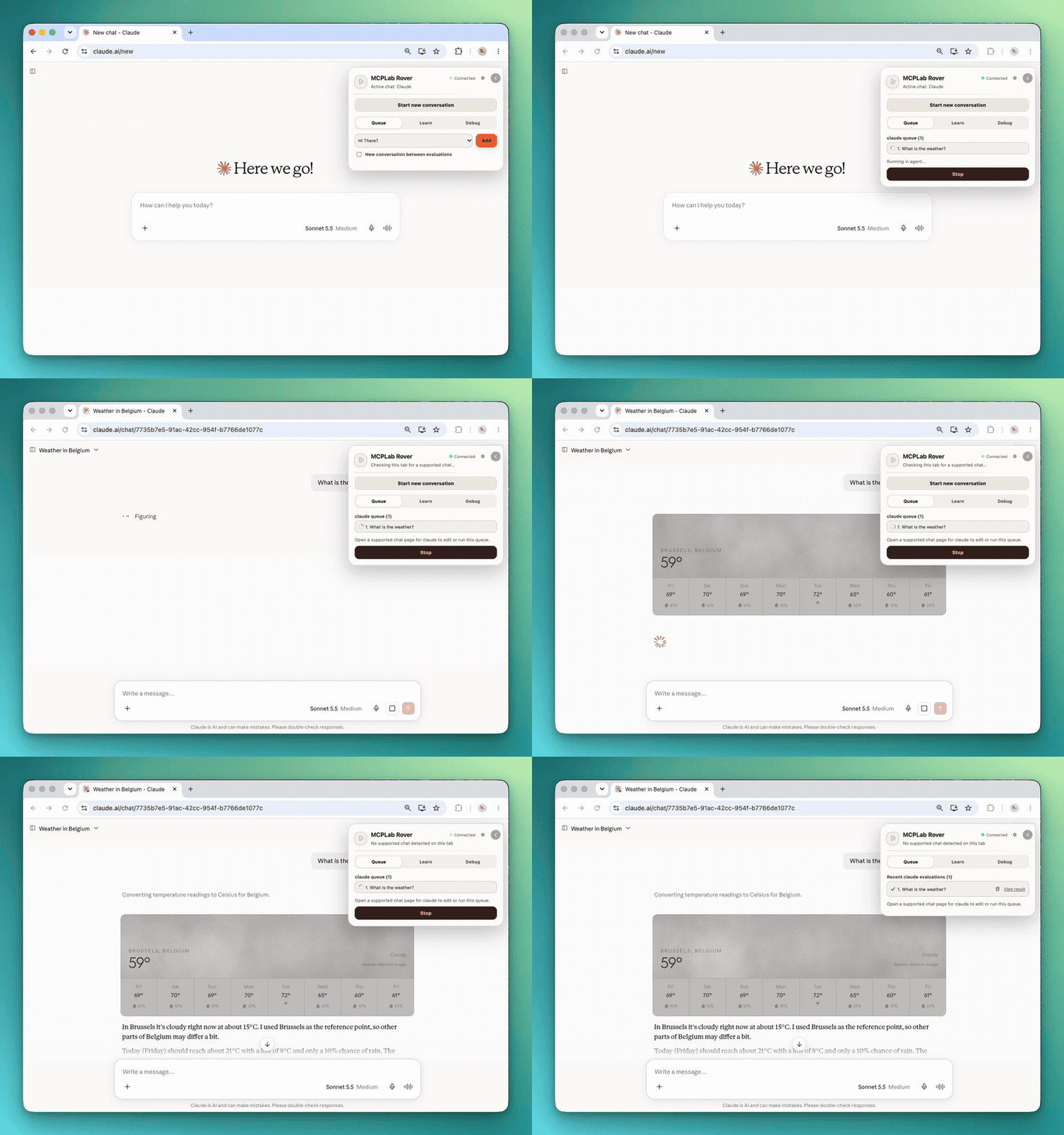
Below we show how Rover connects to a new Claude conversation. Rover extension is activated in the browser, connects to MCPLab, and is ready to run evaluations in the active chat. Claude and ChatGPT work out of the box. Do you have a custom Agent? Just add any Agent as a Rover browser agent, use Rover's Learn flow.
Use Rover with MCPLab
MCPLab can run LLM agents through provider APIs. Rover extends the same evaluation workflow to browser chats, where you work with the agent's current conversation and settings.
- Spend less time repeating prompts: queue scenarios and let Rover submit them sequentially and capture each completed answer.
- Keep your criteria consistent: reuse MCPLab response assertions and judge checks across API and browser runs.
- Make results reviewable: keep captured answers, check results, and run artifacts in MCPLab instead of collecting chat transcripts by hand.
- Choose the conversation context: start a fresh conversation between scenarios for independent checks, or continue the chat when context matters.
- Extend to another compatible browser agent: use Learn to capture and validate a provider profile without writing an adapter yourself.
What Rover Can Verify
Rover captures the assistant's final response. MCPLab evaluates response assertions, judge assertions, and extraction rules using that text. These checks can verify an expected phrase, response format, or answer quality.
Rover does not currently capture MCP tool calls. Assertions about required tools, tool order, or tool inputs are marked not_evaluated. A passing response check does not establish which tools the browser agent used.
When testing an MCP integration, connect your MCP server in the browser agent itself before running the scenarios. Rover submits prompts through that chat; it does not configure the agent's MCP connections or act as an MCP proxy.
- Built-in automation is available for Claude and ChatGPT. Another provider needs a valid learned profile, and compatibility depends on its page layout and controls.
- The current release connects to the local MCPLab App over HTTP loopback origins only.
- Attachment-based Live Tests are not eligible for Rover yet.